
From a single text prompt to an interactive VR scene.
Text2VR is a research-driven system that turns natural language descriptions into VR-ready 3D environments and assets, combining panorama generation, asset extraction, 3D reconstruction, and VR deployment in a single pipeline.
The organization currently maintains a single main repository:
- Repository:
Text2VR/Text2VR
– LangGraph-based backend pipeline (app/, microservice clients, workflows)
– React + TypeScript frontend (src/)
– Service directories for panorama, segmentation, inpainting, and 3D generation
– Docker Compose configuration and pretrained checkpoint folders
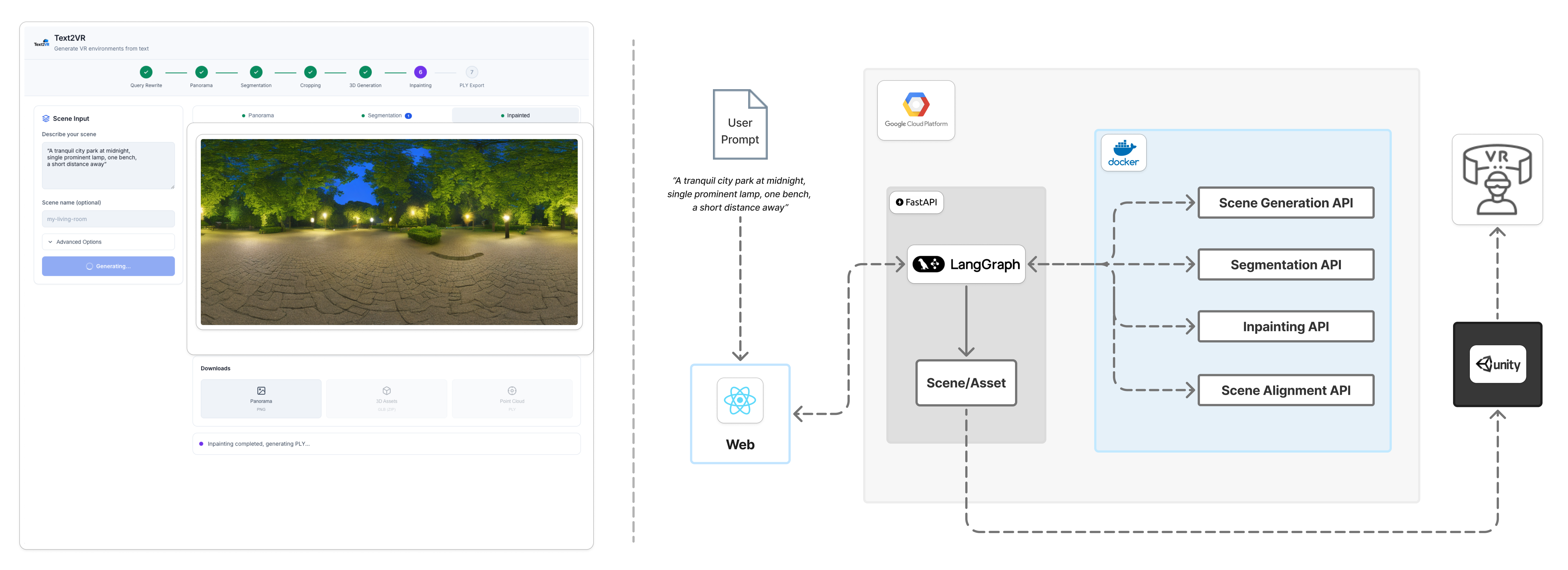
High-level system architecture (see the main repo for full details):
Text2VR is developed in the context of HCI and game/VR research:
-
HCI Korea 2026 (submitted)
“Text2VR: A Modular Pipeline for Interactive VR Scenes from a Single Text Prompt”
– Focuses on a prompt-to-VR authoring workflow and a preliminary user study on perceived ease of use, immersion, time acceptability, and visual quality. -
Journal of the Korea Computer Game Society (submitted)
– Extended journal version emphasizing VR content authoring workflows, automatic asset and background generation, and interactive VR scene construction using Text2VR.
The code in this organization corresponds to these works and is intended to be reproducible and extensible for further research.
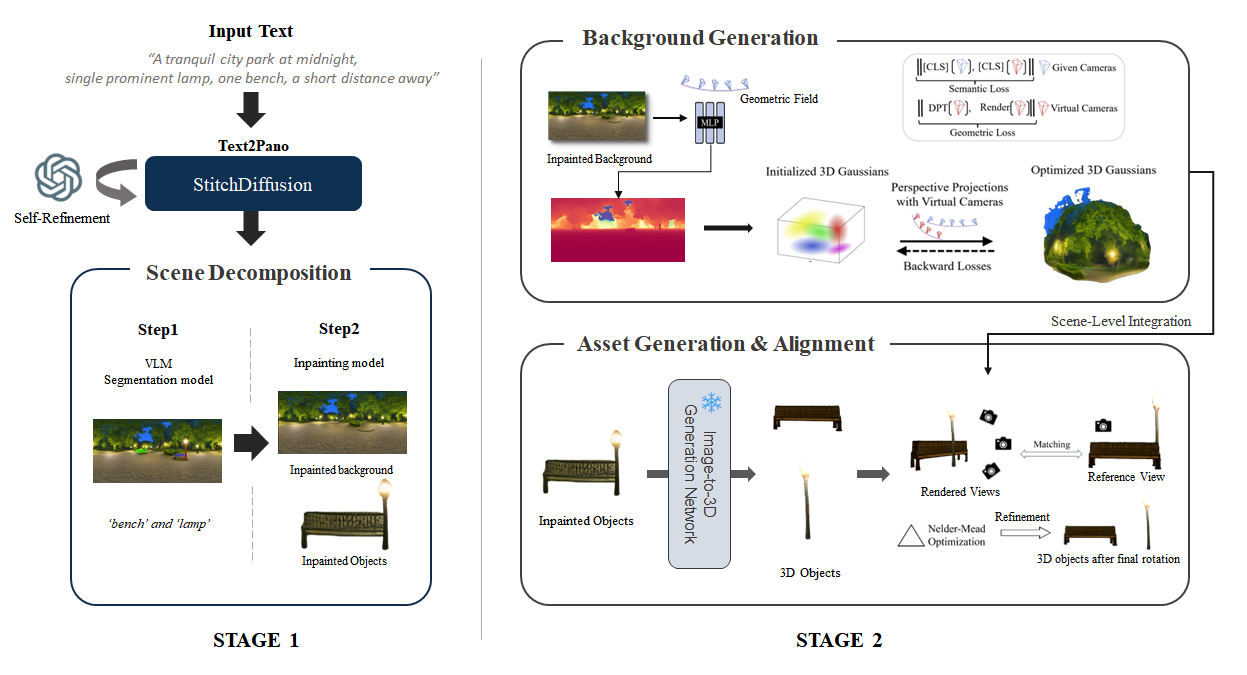
At a high level, the Text2VR pipeline:
- Rewrites user prompts into optimized generation queries (LLM-based query rewrite via LangGraph).
- Generates a 360° panorama from the prompt using DreamScene360 (Stable Diffusion + Stitch Diffusion), with optional self-refinement.
- Segments interactive objects using GPT-4o + GroundingDINO + SAM and crops them as RGBA assets.
- Converts 2D crops into 3D assets with TRELLIS, producing GLB models.
- Inpaints the background after object removal using Stable Diffusion 2 Inpaint (wrap-aware).
- Trains a 3D Gaussian Splatting background from the inpainted panorama (PLY) for immersive VR rendering.
- Packages everything for VR, so scenes can be explored in a VR engine (e.g., Unity with a Gaussian Splatting plugin and colliders/interaction scripts).
A more detailed pipeline overview is available in the Text2VR repository:
-
LangGraph Orchestration
Explicit workflow graph managing query rewrite, panorama generation, segmentation, inpainting, 3D asset generation, and Gaussian Splatting. -
Microservice Architecture (via Docker Compose)
Separate containers for:- Panorama generation (
DREAMSCENE360/→panorama-api) - Segmentation (
ASSET_SEG/→segmentation-api) - Inpainting (
BG_INPAINT/→inpainting-api) - 3D asset generation (TRELLIS →
trellis-api)
- Panorama generation (
-
Frontend Integration
React + TypeScript frontend (src/) for:- Prompt input and scene naming
- Real-time pipeline status and intermediate previews
- Result browsing and download (panorama, assets, PLY, Unity export)
-
VR-focused Outputs
- 3D Gaussian Splatting background (PLY)
- GLB assets ready for import into VR engines
- Unity-ready export endpoints (
unity_assetsAPI) for building interactive VR scenes
For full details, see the Text2VR repository README. At a glance:
app/– FastAPI backend and LangGraph workflowsrc/– React frontendDREAMSCENE360/– Panorama generation serviceASSET_SEG/– Segmentation serviceBG_INPAINT/– Background inpainting servicedocker-compose.yml– Microservice orchestrationdocs/– Architecture and pipeline diagramspre_checkpoints/– Pretrained model weights
Text2VR is developed by Team GARASANI (Capstone Design · Graduation 2025).
 Chang-Min Lee @LeeChangmin0310 Project Lead & Maintainer |
 Soo-Youn Myoung @suyeonmyeong Core Contributor |
 Moon-Sik An @dalsik Core Contributor |
 Young-In Jin @0in11 Core Contributor |
“Garasani (가라사니): the spark of perception, the thread of insight.”
Text2VR explores how unstructured prompts can be transformed into structured, interactive 3D worlds.
- The HCI conference paper and the computer game journal version both reference this organization as the implementation source.
- To reproduce the system:
- Start from
Text2VR/Text2VR - Follow the repository README for environment setup, model downloads, and pipeline execution
- Start from
- Issues and feature requests can be opened on the main repository.