Go语言如何更好的在GCP Stackdriver Logging中打印日志 #82

Description

Go语言如何更好的在GCP Stackdriver Logging中打印日志
使用Cloud Function作为实验环境
使用Go的标准库fmt
- 使用
fmt.Printf()方法打印的日志在没有换行符\n情况下,测试代码如下:
func TestGolangLog(w http.ResponseWriter, r *http.Request) {
  err := errors.New("custom error using New function")
  fmt.Printf("%v", err)

  err = &AppError{Err: "custom error using struct type and fields", Code: 100}
  fmt.Printf("%v", err)

  user := User{
    Name:  fake.UserName(),
    Email: fake.EmailAddress(),
  }
  fmt.Printf("print struct type: %#v", user)

  if _, err := fmt.Fprint(w, "ok"); err != nil {
    http.Error(w, "fmt.Fprint", http.StatusInternalServerError)
  }
}
stackdriver Logging 输出日志如下:

可以看到,只打印出了一行日志,这行日志的textPayload的字段包含了所有日志内容。显然,这样的日志可读性很差。
- 使用
fmt.Printf()方法打印的日志在有换行符\n情况下,测试代码如下:
func TestGolangLogWithNewlineSymbol(w http.ResponseWriter, r *http.Request) {
  err := errors.New("custom error using New function")
  fmt.Printf("%v\n", err)

  err = &AppError{Err: "custom error using struct type and fields", Code: 100}
  fmt.Printf("%v\n", err)

  user := User{
    Name:  fake.UserName(),
    Email: fake.EmailAddress(),
  }
  fmt.Printf("print struct type: %#v\n", user)

  if _, err := fmt.Fprint(w, "ok"); err != nil {
    http.Error(w, "fmt.Fprint", http.StatusInternalServerError)
  }
}
stackdriver Logging 输出日志如下:

可以看到,加入换行符以后,每条日志打印一行,有较好的可读性,很容易区分每条日志。
使用Go的标准库log
- 使用
log.Printf()方法打印的日志在有换行符\n情况下,测试代码如下:
func TestGolangLogUsingLog(w http.ResponseWriter, r *http.Request) {
  err := errors.New("custom error using New function")
  log.Printf("%v\n", err)

  err = &AppError{Err: "custom error using struct type and fields", Code: 100}
  log.Printf("%v\n", err)

  user := User{
    Name:  fake.UserName(),
    Email: fake.EmailAddress(),
  }
  log.Printf("print struct type: %#v\n", user)

  if _, err := fmt.Fprint(w, "ok"); err != nil {
    http.Error(w, "fmt.Fprint", http.StatusInternalServerError)
  }
}
stackdriver Logging 输出日志如下:

可以看到,加入换行符以后,每条日志打印一行,有较好的可读性,很容易区分每条日志,但是又额外打印出了时间戳,和stackdriver Logging提供的日志时间戳功能重复。
不论是使用fmt还是使用log标准库的Printf()方法,除了上述换行符和时间戳的问题,在stackdriver Logging中打印的日志还存在如下问题:
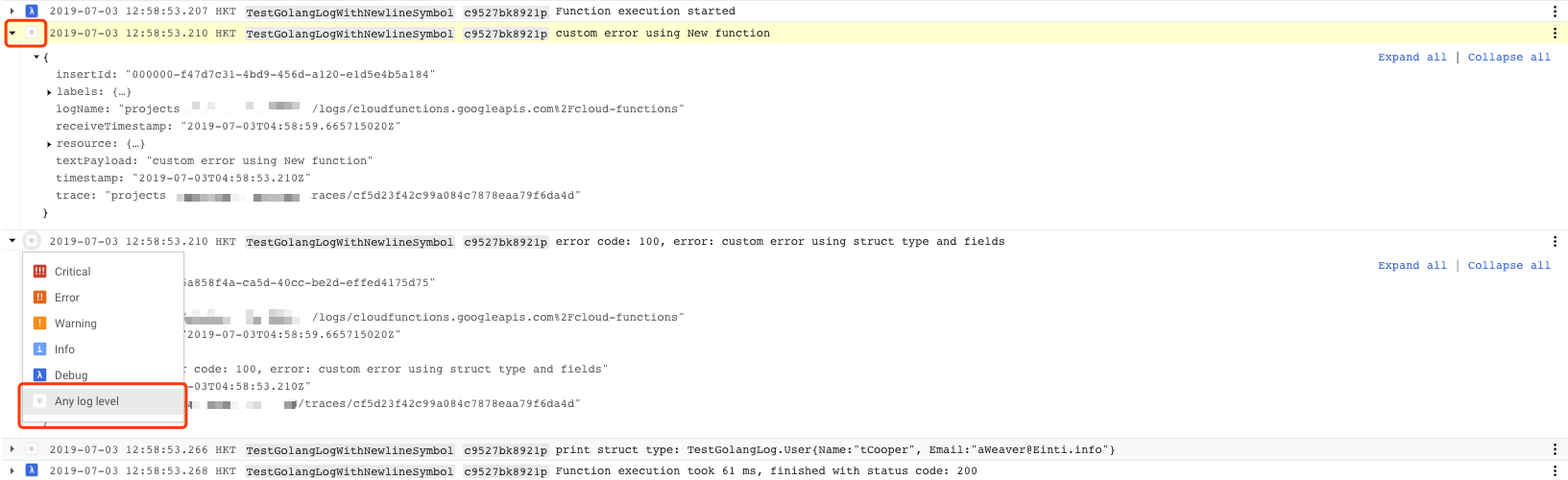
- 没有日志级别,在stackdriver Logging中显示的是
Any log level,如下图:
-
无法打印结构化日志,日志主体都以字符串的形式保存在
textPayload字段中,从而导致无法使用stackdriver Logging强大的日志过滤功能. -
无法给日志添加标签Labels,因此没有标签纬度的分组,过滤功能
使用GCP提供的logging package
本着不重复造轮子的原则,找到了GCP官方提供的logging package。
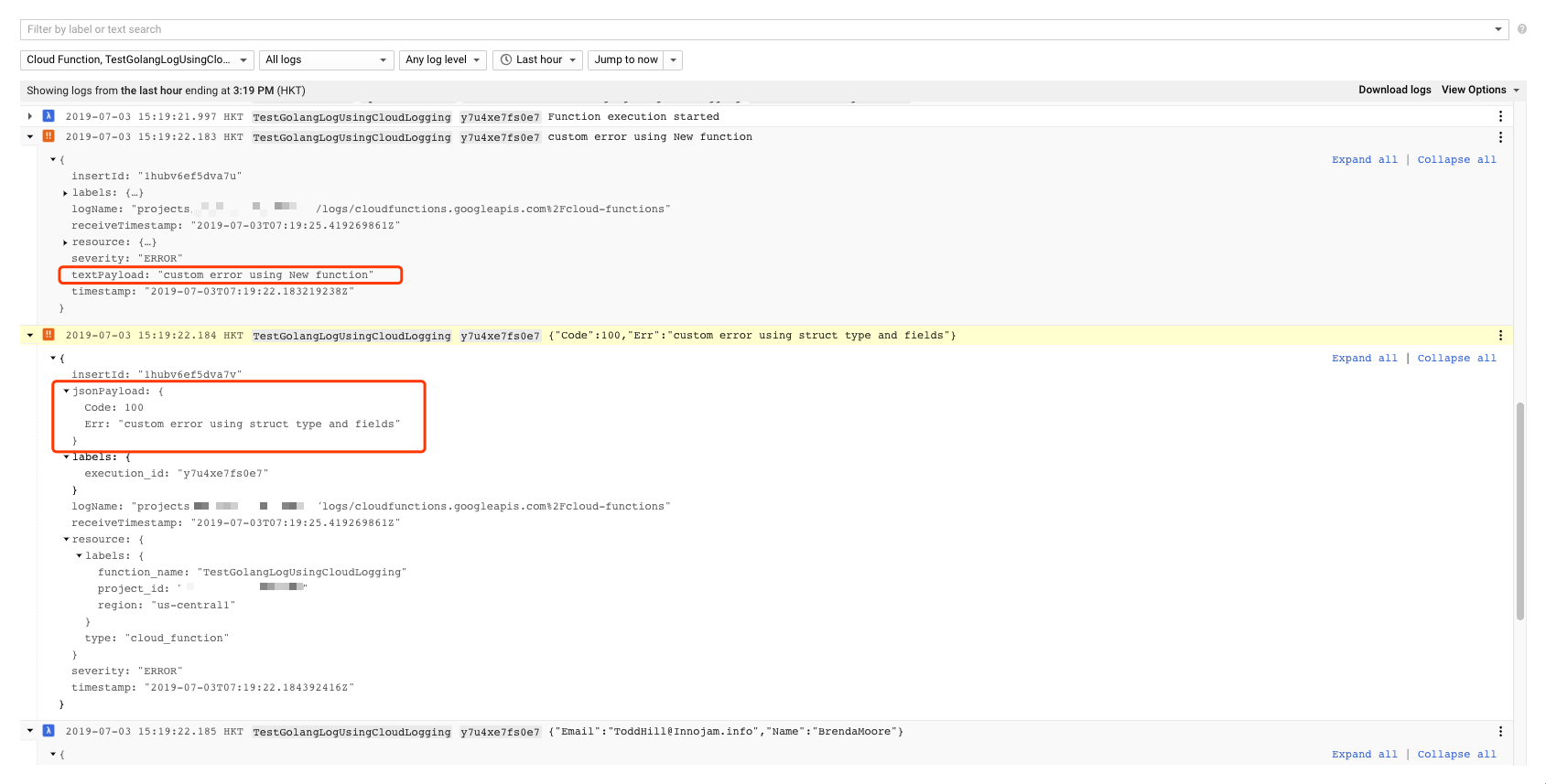
打印的日志即可以是简单的字符串, textPayload字段的值是日志主体(entry),也可以是结构化日志,jsonPayload字段的值是日志主体,并且可以设置log level,Severity字段的值为log level。示例如下:
需要注意的是,使用该logging package时,默认配置打印的日志关联在Google Project资源类型上。官方默认配置如下:
// Sample stdlogging writes log.Logger logs to the Stackdriver Logging.
package main

import (
  "context"
  "log"

  "cloud.google.com/go/logging"
)

func main() {
  ctx := context.Background()

  // Sets your Google Cloud Platform project ID.
  projectID := "YOUR_PROJECT_ID"

  // Creates a client.
  client, err := logging.NewClient(ctx, projectID)
  if err != nil {
    log.Fatalf("Failed to create client: %v", err)
  }
  defer client.Close()

  // Sets the name of the log to write to.
  logName := "my-log"

  logger := client.Logger(logName).StandardLogger(logging.Info)

  // Logs "hello world", log entry is visible at
  // Stackdriver Logs.
  logger.Println("hello world")
}
在stackdriver Logging中过滤条件中选择资源类型为Google Project => <Project ID>:
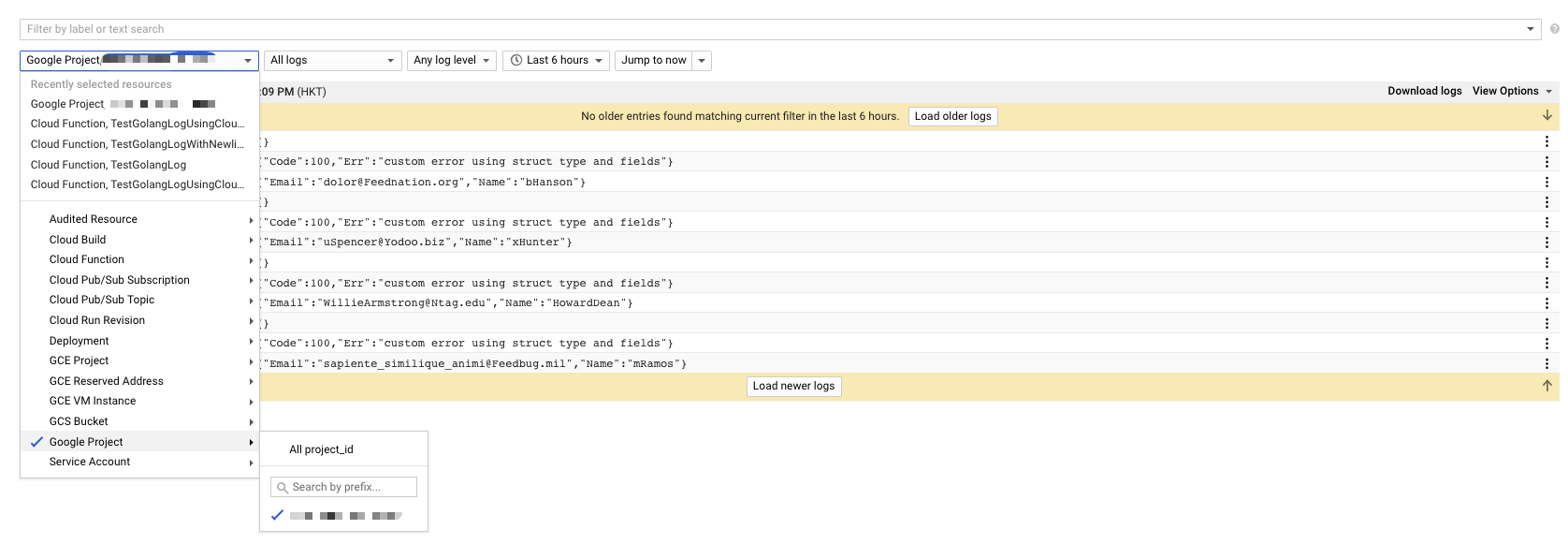
很明显,这不是我们想要的结果,因为这些日志没有关联在相应的资源类型上面,本文使用的资源是Cloud Function,也可以是其他资源类型,如Compute Engine, App Engine等等。
因此,如果要将打印的日志关联到Cloud Function这个资源类型(resource type)上,需要做如下配置:
func createLogger(r *http.Request) (*logging.Logger, *logging.Client, error) {
  ctx := context.Background()
  client, err := logging.NewClient(ctx, ProjectId)
  if err != nil {
    return nil, nil, err
  }

  logName := "cloudfunctions.googleapis.com/cloud-functions"
  logger := client.Logger(
    logName,
    logging.CommonResource(&mrpb.MonitoredResource{
      Labels: map[string]string{
        "function_name": os.Getenv("FUNCTION_NAME"),
        "project_id":    os.Getenv("GCP_PROJECT"),
        "region":        os.Getenv("FUNCTION_REGION"),
      },
      Type: "cloud_function",
    }),
    logging.CommonLabels(map[string]string{
      "execution_id": r.Header.Get("Function-Execution-Id"),
    }),
  )
  return logger, client, nil
}
使用上述日志组件的Cloud Function代码如下:
func TestGolangLogUsingCloudLogging(w http.ResponseWriter, r *http.Request) {

  logger, client, err := createLogger(r)
  if err != nil {
    fmt.Printf("%v", err)
    http.Error(w, "create logger error", http.StatusInternalServerError)
    return
  }

  defer func() {
    if err := client.Close(); err != nil {
      fmt.Printf("closing logging client error: %#v", err)
      http.Error(w, "closing logging client error", http.StatusInternalServerError)
      return
    }
  }()

  err = errors.New("custom error using New function")
  logger.Log(logging.Entry{Payload: err.Error(), Severity: logging.Error})

  err = &AppError{Err: "custom error using struct type and fields", Code: 100}
  logger.Log(logging.Entry{Payload: err, Severity: logging.Error})

  user := User{
    Name:  fake.UserName(),
    Email: fake.EmailAddress(),
  }
  logger.Log(logging.Entry{Payload: user, Severity: logging.Debug})

  if _, err := fmt.Fprint(w, "ok"); err != nil {
    http.Error(w, "fmt.Fprint", http.StatusInternalServerError)
  }
}
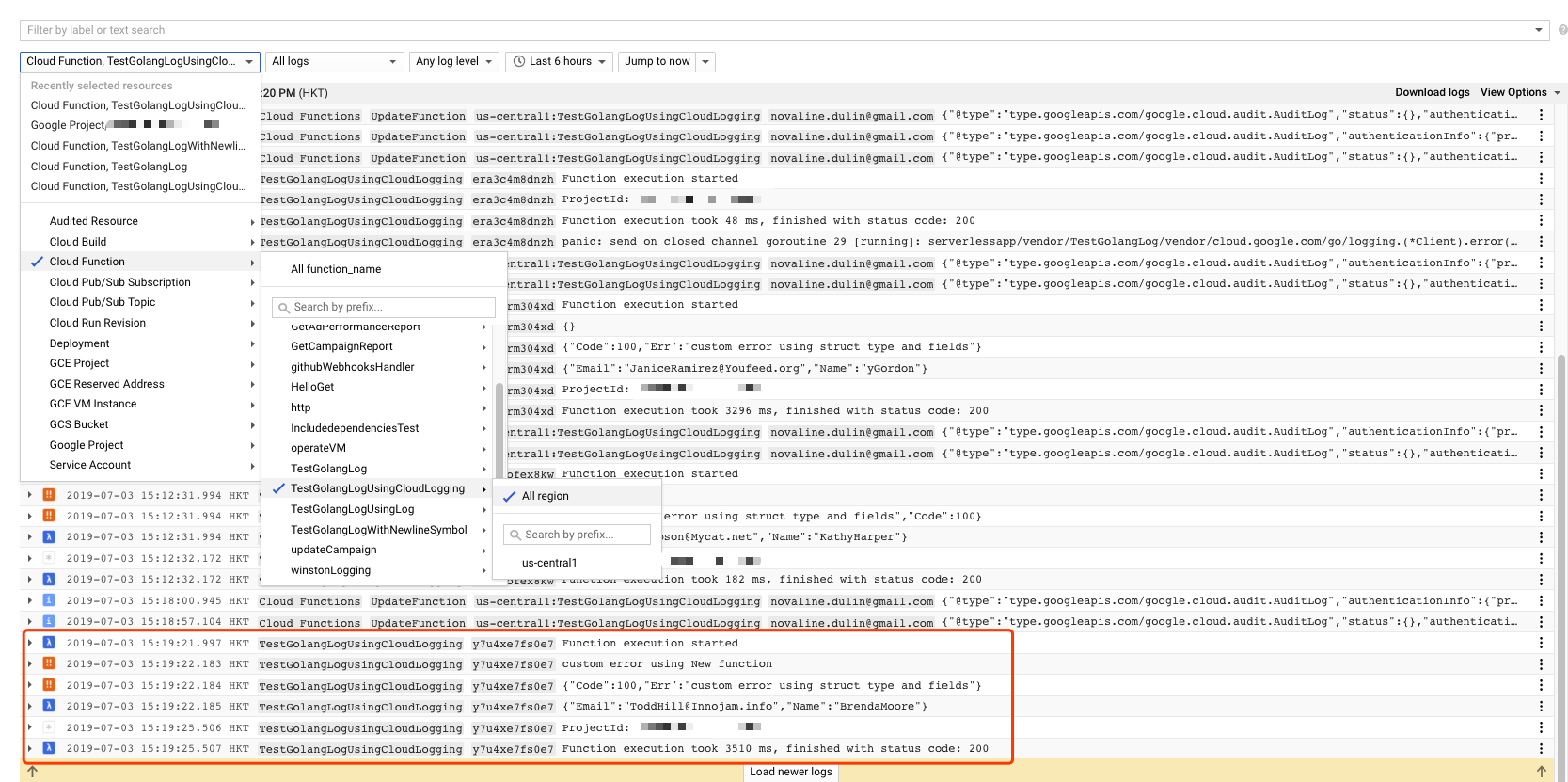
打印的日志都关联在相应的Cloud Function下了:
参考
- https://cloud.google.com/logging/docs/setup/go
- https://godoc.org/cloud.google.com/go/logging
- How to log to GCP Stackdriver? googlearchive/cloud-functions-go#13 (comment)
- https://cloud.google.com/functions/docs/env-var
源码
https://github.com/mrdulin/golang/tree/master/src/gcp-stackdriver/01-logging